IEglatone Theme for WordPress|
A personal and professional profile theme for technologists, inventors, investors, and expert witnesses.
Eglatone is a WordPress theme that transforms the music-focused Abletone theme into a powerful platform for showcasing professional achievements, press coverage, and thought leadership. It’s designed specifically for technologists, entrepreneurs, inventors, expert witnesses, and investors who want to present their expertise in a compelling, modern format.
🌟 What Makes Eglatone Special#
While built on Abletone’s solid foundation, Eglatone adds several enterprise-grade features:
✨ New Features#
| Feature | Description |
|---|---|
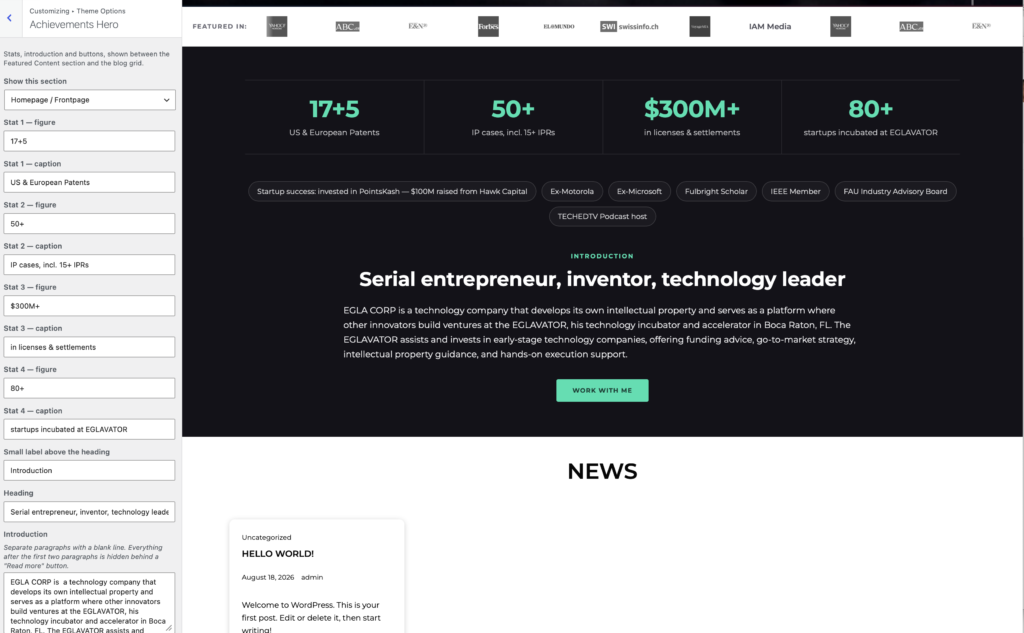
| Achievements Hero | Statistics band with headline metrics (patents, cases, settlements), highlight pills (credentials), introduction with “Read more” fold, CV download button, and a CTA form with honeypot, timing checks, nonce, and rate limiting. |
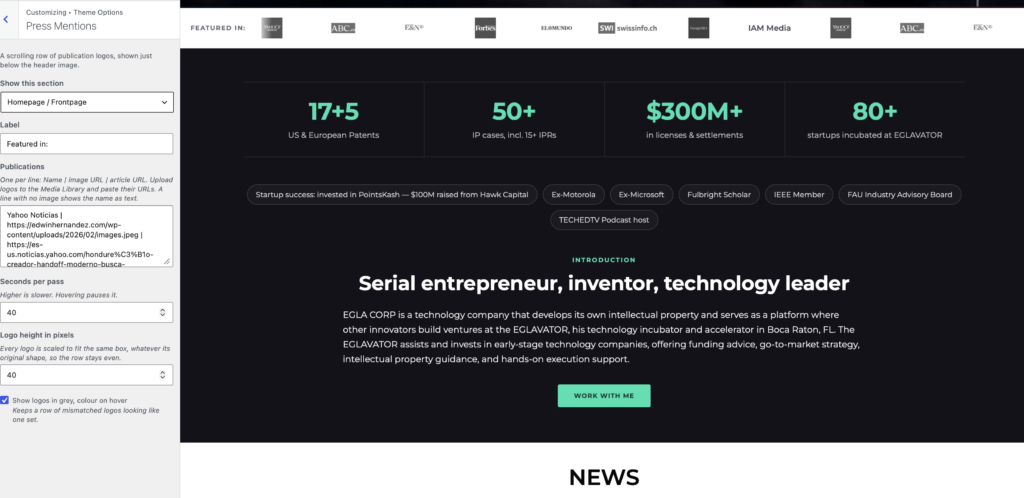
| Press Mentions Strip | A seamless, auto-scrolling marquee of publication logos. Each logo is uniformly framed, rendered in grayscale, and colored on hover. Powered by your RSS or Atom feed. |
| News Ticker | A professional ticker showing your latest podcast episodes, blog posts, or press releases. Driven by any RSS or Atom feed, cached in transients for performance, with live feed-status monitoring in the Customizer. |
| Blog Grid | 2, 3, or 4-column responsive grid with an intelligent “… more” button that loads batches via AJAX instead of traditional pagination. |
| Section Carousels | Services and Featured Content sections render as configurable carousels (1-4 columns) for a modern, mobile-friendly experience. |
| Single Post Media Band | For podcasts and video content: featured image on a full-bleed band, audio player beneath it, category chips, author byline, and reading/listening time. |
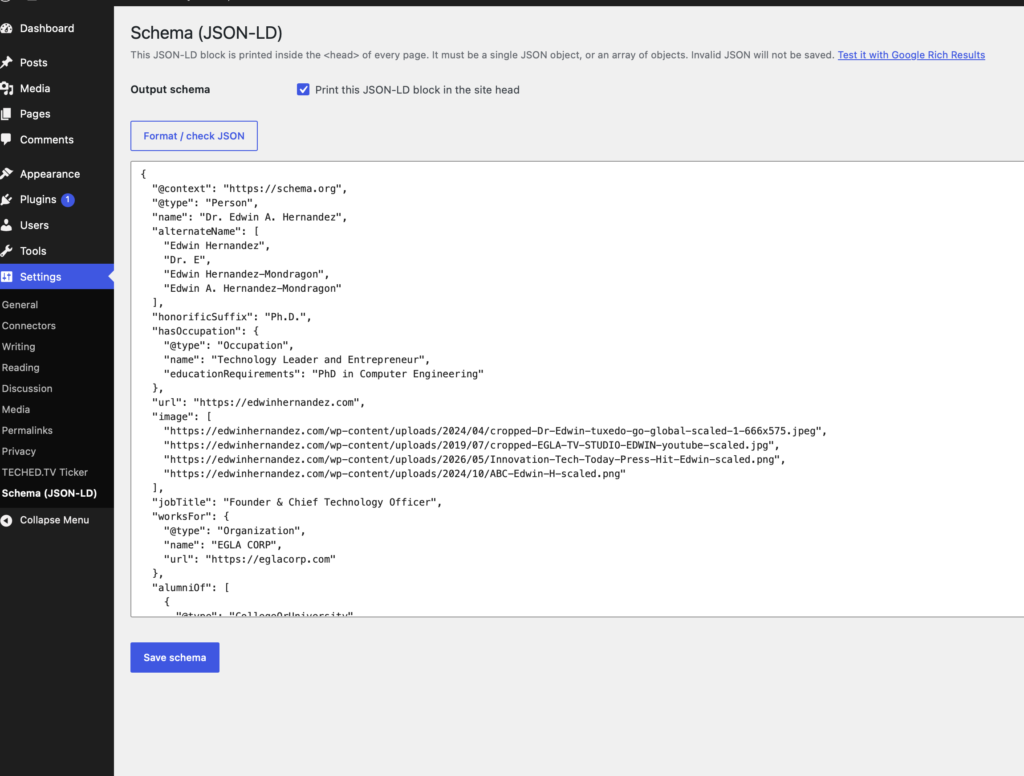
| JSON-LD Schema Editor | Validated schema editor at Settings > Schema (JSON-LD) that keeps the last valid document live even if an invalid edit is submitted. Supports Person, Organization, VideoObject, and more. |
All features are optional and independently toggleable via Appearance > Customize > Theme Options.
🔧 Advanced Technical Details#
JSON-LD Schema System#
The JSON-LD schema system provides professional SEO and structured data capabilities:
How It Works#
- Validation on Save: Every JSON-LD submission is validated using PHP’s
json_decode()with strict error checking - Fallback Protection: Invalid JSON never replaces the live schema; the previous valid document remains active
- Draft Preservation: Invalid submissions are stored in
eglatone_jsonld_schema_draftfor easy editing - Transient Caching: Valid schemas are cached for optimal performance
- Conditional Output: Schema output can be toggled per page via the Settings > Schema (JSON-LD) panel
Default Schema Structure#
The default schema is optimized for technologists and includes:
- Person with name, honorificSuffix, hasOccupation
- Professional Details: jobTitle, worksFor, alumniOf
- Expertise: knowsAbout, description, award
- Contact Information: email, telephone, sameAs (social profiles)
- Content: subjectOf (video objects), image array
- Intellectual Property: patents, licenses, settlements
Schema Customization Example#
// Add custom schema modifications
add_filter( 'eglatone_get_schema_jsonld', function( $jsonld ) {
    $schema = json_decode( $jsonld, true );

    // Add custom field
    $schema['knowsAbout'][] = 'MEVIA Operating System';

    return json_encode( $schema, JSON_PRETTY_PRINT | JSON_UNESCAPED_SLASHES );
} );
Achievements Hero System#
The Achievements Hero creates a compelling first impression with multiple data points:
Statistics Band Configuration#
- 4 Stat Tiles: Each with configurable value and label
- Format: Plain text with HTML entity support (e.g.,
17+→17+,&→&) - Styling: Styled tiles with icon placeholders and hover effects
Credential Highlight Pills#
- Flexible Display: Up to 10+ credentials displayed as styled badges
- Auto-wrapping: Credentials wrap gracefully on smaller screens
- Custom Text: Full control over credential text and formatting
CTA Form Features#
The built-in contact form includes robust spam protection:
- Honeypot Field: Hidden field traps bots
- Timing Check: Rejects submissions faster than 3 seconds
- Nonce Verification: CSRF protection
- Rate Limiting: Configurable submission limits per IP
- Email Notification: Optional email alerts for new submissions
Form Customization#
// Customize form behavior
add_filter( 'eglatone_hero_cta_form_args', function( $args ) {
    $args['success_message'] = 'Thank you for your inquiry! I will respond within 24 hours.';
    return $args;
} );
Press Mentions Strip System#
The Press Mentions Strip displays professional recognition from publications:
How It Works#
- Feed-Driven: Reads from any RSS or Atom feed
- Auto-Discovery: Looks for enclosure images, featured images, or logo patterns
- Image Processing: Uniform sizing with grayscale default
- Caching: 6-hour transient cache reduces external requests
- Fallback: Gracefully handles missing or malformed images
Configuration Options#
- Feed URL: Custom RSS or Atom feed (default:
/feed/podcast) - Item Count: 2-30 items displayed
- Scroll Speed: 10-240 seconds for one complete pass
- Display Mode: Auto-scroll, pause on hover, reverse direction
Feed Requirements#
For best results, feeds should include:
- ** enclosure** tags with images, OR
- elements, OR
- media:content tags with thumbnails
News Ticker System#
The News Ticker keeps visitors informed with your latest content:
Technical Implementation#
- Feed Parsing: Uses WordPress
fetch_feed()function - Caching Strategy: Transient cache with unique key per feed URL + item count
- Error Handling: Graceful degradation on feed failures
- Live Status: Customizer preview shows feed health indicator
Feed Processing Pipeline#
- Validation: Check feed URL is valid and accessible
- Fetch: Retrieve feed via
fetch_feed() - Parse: Extract title, link, date, and thumbnail for each item
- Filter: Apply
eglatone_ticker_itemsfilter for customization - Cache: Store in transient for 6 hours
Custom Ticker Display#
// Modify ticker items before display
add_filter( 'eglatone_ticker_items', function( $items ) {
    foreach ( $items as &$item ) {
        $item['title'] = '📢 ' . $item['title'];
    }
    return $items;
} );
Blog Grid System#
The AJAX-powered blog grid provides seamless content loading:
Grid Configuration#
- Column Options: 2, 3, or 4 columns (configurable in Customizer)
- Batch Size: Default 16 posts per batch, configurable 1-100
- Category Filtering: Select specific categories to display
- Infinite Loading: Click “… more” to load next batch
AJAX Implementation#
- Nonce Security: All AJAX requests include WordPress nonce
- Query Matching: AJAX query mirrors main query arguments
- Template Rendering: Uses same template parts as main query
- Error Handling: Graceful fallback on AJAX failures
Custom Grid Behavior#
// Modify grid query arguments
add_filter( 'eglatone_blog_grid_query_args', function( $args, $paged ) {
    $args['meta_query'] = array(
        array(
            'key' => 'featured_post',
            'value' => '1',
            'compare' => '=',
        ),
    );
    return $args;
}, 10, 2 );
Section Carousels System#
Services and Featured Content render as responsive carousels:
Carousel Features#
- Owl Carousel 2.3.4: Industry-standard carousel library
- Configurable Columns: 1-4 columns per section
- Responsive Breakpoints: Automatically adjusts columns on mobile
- Touch Support: Swipe gestures on touch devices
- Navigation Controls: Previous/Next buttons and pagination dots
Carousel Configuration#
Each carousel section supports:
- Enable/Disable: Toggle visibility per section
- Column Count: 1-4 columns (2, 3, or 4 recommended)
- Background Image: Optional hero background
- Item Limit: Maximum items to display
Single Post Media Band#
Enhanced media display for podcast and video posts:
Media Features#
- Full-Bleed Band: Featured image spans full width
- Audio Player: Embedded MediaElement.js player
- Category Chips: Styled category links
- Reading Time: Estimated reading/listening time
- Author Byline: Display author information
Media Processing#
- Featured Image: Pulls post thumbnail with custom size
- Audio Detection: Identifies audio attachments
- Player Embed: Generates MediaElement.js player
- Reading Time: Calculates based on content length
- Metadata: Displays category and author information
🎯 Perfect For#
🎯 Perfect For#
- Technology Leaders – Showcase your technical expertise and innovations
- Inventors – Highlight your patent portfolio and innovations
- Expert Witnesses – Demonstrate your credibility with case statistics and credentials
- Investors – Present your portfolio and investment expertise
- Entrepreneurs – Launch ventures from your professional profile
- Podcasters – Feature your latest episodes with the news ticker
🛠️ Developer Guide#
Customization Hooks#
Eglatone provides extensive hooks for developers to customize behavior:
Action Hooks#
// Before sections render
do_action( 'eglatone_before_sections' );

// After sections render
do_action( 'eglatone_after_sections' );

// Before achievements hero
do_action( 'eglatone_before_hero' );

// After achievements hero
do_action( 'eglatone_after_hero' );

// Before ticker
do_action( 'eglatone_before_ticker' );

// After ticker
do_action( 'eglatone_after_ticker' );
Filter Hooks#
| Hook | Parameters | Description |
|---|---|---|
eglatone_blog_grid_columns | (int) | Change blog grid column count |
eglatone_section_columns | (int, string $section) | Modify carousel columns per section |
eglatone_ticker_feed_url | (string) | Override ticker feed source |
eglatone_ticker_items | (array) | Modify ticker items before display |
eglatone_ticker_count | (int) | Change number of items displayed |
eglatone_get_schema_jsonld | (string) | Modify final JSON-LD output |
eglatone_hero_defaults | (array) | Change hero defaults |
eglatone_use_blog_grid | (bool) | Enable/disable blog grid |
eglatone_blog_grid_query_args | (array, int $paged) | Modify grid AJAX query |
eglatone_get_theme_layout | (string) | Override theme layout |
eglatone_body_classes | (array) | Add custom body classes |
Template Overrides#
To override any template part in a child theme:
child-theme/
└── template-parts/
    ├── content/
    │   └── content.php
    ├── hero-content/
    │   └── content-hero.php
    ├── ticker/
    │   └── display-ticker.php
    └── ...
Child Theme Setup#
Create a functions.php file in your child theme:
<?php
function my_child_theme_enqueue_scripts() {
    wp_enqueue_style( 'parent-style', get_template_directory_uri() . '/style.css' );
    wp_enqueue_style( 'child-style', get_stylesheet_directory_uri() . '/style.css', array( 'parent-style' ) );
}
add_action( 'wp_enqueue_scripts', 'my_child_theme_enqueue_scripts' );
Custom Section Example#
// Create a custom section
function my_custom_section() {
    if ( ! eglatone_check_section( get_theme_mod( 'my_custom_section_option', 'disabled' ) ) ) {
        return;
    }
    ?>
    <section id="my-custom-section" class="my-custom-section">
        <div class="wrapper">
            <h2><?php echo esc_html( get_theme_mod( 'my_custom_section_title', 'My Section' ) ); ?></h2>
            <?php echo wp_kses_post( get_theme_mod( 'my_custom_section_content', '' ) ); ?>
        </div>
    </section>
    <?php
}

// Register in the sections function
add_action( 'eglatone_before_sections', 'my_custom_section' );
🔒 Security Considerations#
Form Protection#
The Achievements Hero CTA form includes multiple security layers:
- Nonce Verification: All form submissions include a time-limited nonce
- Honeypot Field: Hidden field that bots typically fill out
- Timing Check: Rejects submissions faster than 3 seconds (bot detection)
- Rate Limiting: Configurable limit on submissions per IP address
- Input Sanitization: All user inputs are sanitized before processing
- CSRF Protection: WordPress nonce system prevents cross-site request forgery
Schema Validation#
The JSON-LD schema editor includes:
- Strict JSON Validation: Invalid JSON never saves as live schema
- Fallback Protection: Previous valid schema remains active
- Draft Preservation: Invalid submissions saved for editing
- Output Escaping: All schema output properly escaped
Feed Processing#
News ticker feed processing includes:
- URL Validation: Feed URLs are validated with
esc_url_raw() - Timeout Protection: Feed fetches have configurable timeouts
- Caching: Reduces external requests and prevents abuse
- Error Handling: Graceful degradation on feed failures
Database Security#
Eglatone uses WordPress’s built-in security:
- Prepared Queries: All database queries use prepared statements
- Option Sanitization: All theme_mods are sanitized on save
- Transients API: Uses WordPress’s secure transient system
📊 Performance Optimization#
Caching Strategy#
Eglatone implements multiple caching layers:
- Transient Cache: Feed data cached for 6 hours
- Object Cache: Schema data cached when possible
- Query Caching: Optimized WP_Query usage
- Asset Minification: CSS/JS minified in production
Performance Tuning#
// Adjust cache duration
add_filter( 'eglatone_ticker_cache_duration', function() {
    return 12 * HOUR_IN_SECONDS; // Cache for 12 hours
} );

// Disable caching for development
if ( defined( 'WP_DEBUG' ) && WP_DEBUG ) {
    add_filter( 'eglatone_use_cache', '__return_false' );
}
Asset Loading#
Optimized asset loading:
- Conditional Loading: Scripts load only where needed
- Footer Loading: JavaScript loads in footer for better performance
- Dependency Management: Proper WordPress dependencies
- Minification: Production builds are minified
🌐 Internationalization#
Translation Ready#
Eglatone is fully translation-ready with the text domain eglatone.
Creating Translations#
- Generate POT file:
# Using wp-cli
wp i18n make-pot . languages/eglatone.pot
- Create translation:
- Use Poedit or similar tool
- Translate all strings in
languages/eglatone.pot - Save as
languages/eglatone-XX_XX.po
- Compile MO file:
- Poedit automatically compiles .mo file
- Or use:
msgfmt languages/eglatone-XX_XX.po -o languages/eglatone-XX_XX.mo
Supported Languages#
To add language support, place files in languages/:
languages/eglatone.pot
languages/eglatone-en_US.mo
languages/eglatone-es_ES.mo
languages/eglatone-fr_FR.mo
languages/eglatone-de_DE.mo
languages/eglatone-ja_JP.mo
RTL Support#
Eglatone includes rtl.css for right-to-left language support. The RTL stylesheet is automatically loaded when the site language is RTL.
📱 Mobile Responsiveness#
Responsive Breakpoints#
Eglatone uses a mobile-first approach with the following breakpoints:
- Mobile: < 480px
- Phablet: 480px – 767px
- Tablet: 768px – 1024px
- Desktop: 1025px – 1200px
- Large Desktop: > 1200px
Mobile Features#
- Touch-Optimized Carousels: Swipe support for mobile users
- Responsive Images: Mobile-optimized featured images
- Touch-Friendly Forms: Optimized input sizes and touch targets
- Fast Loading: Optimized assets for mobile networks
🔍 SEO & Structured Data#
Schema.org Markup#
The JSON-LD schema system implements:
- Person Schema: For individual profiles
- Organization Schema: For company profiles
- VideoObject: For video content
- Article: For blog posts
- BreadcrumbList: Navigation hierarchy
SEO Best Practices#
Eglatone implements:
- Semantic HTML5: Proper document structure
- ARIA Labels: Accessibility attributes
- Schema Markup: Structured data for search engines
- Open Graph: Social media sharing optimization
- Twitter Cards: Twitter-specific metadata
- Canonical URLs: Proper canonical tag implementation
🧪 Testing Checklist#
Before deploying Eglatone to production:
- Test all sections on desktop, tablet, and mobile
- Verify form spam protection works correctly
- Test schema editor with valid and invalid JSON
- Verify ticker displays feed items correctly
- Test blog grid AJAX loading
- Verify carousel responsiveness
- Test contact form with different browsers
- Verify all external links work
- Test with caching plugins
- Verify translation functionality
🐛 Troubleshooting#
🚀 Quick Start#
Installation#
- Upload via WordPress Admin
- Go to Appearance → Themes → Add New → Upload Theme
- Choose the
eglatone.zipfile - Click “Install Now” then “Activate”
- Configure Your Theme
- Navigate to Appearance → Customize → Theme Options
- Enable the sections you want (Achievements Hero, Press Mentions, News Ticker, etc.)
- Upload your media and enter your content
- Set Up the Schema (JSON-LD)
- Go to Settings → Schema (JSON-LD)
- Review and customize the Person schema (pre-populated with Dr. Edwin Hernandez’s profile as an example)
- The schema is validated on save and cached for performance
Migrating from Abletone#
If you’re upgrading from the Abletone theme, use the included migration script to transfer your existing Customizer settings:
# Back up your database first
wp db export backup-before-eglatone.sql

# Run the migration (dry run first to see what will change)
wp eval-file migrate-eglatone.php

# If everything looks good, commit the changes
wp eval-file migrate-eglatone.php --apply
See MIGRATING-FROM-ABLETONE.md for detailed migration instructions.
📋 Features in Detail#
Achievements Hero Section#
The hero section is designed to make a powerful first impression:
- Statistics Band: Up to 4 metric tiles (e.g., “17+ patents”, “$300M+ settlements”)
- Highlight Pills: Credentials displayed as styled badges (e.g., “Ex-Microsoft”, “Fulbright Scholar”, “TECHEDTV Host”)
- Introduction: Expandable text with “Read more” functionality
- CTA Form: Built-in contact form with spam protection (honeypot, timing checks, nonce, rate limiting)
- CV Download Button: Link to your downloadable CV/resume
Press Mentions Strip#
A professional, scrollable strip of publication logos:
- Auto-scrolling: Configurable speed (10-240 seconds for one full pass)
- Feed-Driven: Pulls from any RSS or Atom feed (default:
/feed/podcast) - Responsive Design: Logos scale gracefully on mobile devices
- Hover Effects: Grayscale by default, color on hover
- Cached Performance: Feed data cached for 6 hours
News Ticker#
Keep visitors informed with your latest content:
- Flexible Feed Support: Works with RSS, Atom, or custom feed URLs
- Configurable Item Count: Display 2-30 items
- Live Status Monitoring: See feed health directly in the Customizer
- Performance Optimized: Uses WordPress transients for efficient caching
- Seamless Loop: No gaps or pauses between loop cycles
Blog Grid with Infinite Loading#
Modern, AJAX-powered blog listing:
- Column Options: 2, 3, or 4 columns (configurable in Customizer)
- Incremental Loading: Click “… more” to load the next batch
- Category Filtering: Show posts from specific categories
- No Pagination: Seamless browsing experience
JSON-LD Schema Editor#
Professional SEO and structured data:
- Validated Editor: Invalid JSON is never saved as the live schema
- Fallback Protection: Previous valid document remains active
- Draft Preservation: Invalid submissions are saved as drafts for editing
- Toggle Control: Enable/disable schema output per page
- Pre-filled Template: Starts with a Person schema optimized for technologists
🎨 Theme Customization#
All sections are controlled via the WordPress Customizer:
Appearance → Customize → Theme Options
Key configuration options:
| Section | Key Settings |
|---|---|
| Achievements Hero | Enable/disable, stats values/labels, credentials, CTA text, form title/intro |
| Press Mentions | Enable/disable, feed URL, ticker speed |
| News Ticker | Enable/disable, feed URL, item count, ticker speed |
| Blog Grid | Enable/disable, columns (2-4), batch size, category filtering |
| Services | Enable/disable, carousel columns (1-4), background image |
| Featured Content | Enable/disable, carousel columns (1-4), background image |
| Portfolio | Enable/disable, background image |
| Testimonials | Enable/disable |
| Hero Content | Enable/disable, select page, display content/excerpt |
| Header Media | Upload image, set overlay, text options |
🛠️ Technical Details#
Requirements#
- WordPress 5.9 or higher
- PHP 7.0 or higher (PHP 8.0+ recommended)
- MySQL 5.6 or higher / MariaDB 10.0 or higher
Theme Structure#
eglatone/
├── assets/
│   ├── css/           # Compiled stylesheets
│   ├── images/        # Theme images
│   └── js/            # JavaScript files
├── inc/
│   ├── customizer/    # Customizer controls and sections
│   ├── hero.php       # Achievements hero functionality
│   ├── schema-jsonld.php  # JSON-LD schema editor
│   ├── ticker.php     # News ticker functionality
│   └── template-functions.php  # Core theme functions
├── template-parts/    # Modular template parts
│   ├── content/       # Content templates
│   ├── featured-content/
│   ├── hero-content/
│   ├── slider/
│   ├── ticker/
│   └── ...
├── templates/         # Page templates
├── languages/         # Translation files
├── functions.php      # Theme setup and core functionality
├── style.css          # Main stylesheet
└── readme.txt         # WordPress.org readme
Key Functions#
| Function | Purpose |
|---|---|
eglatone_sections() | Renders all homepage sections |
eglatone_hero_section() | Renders the Achievements Hero |
eglatone_press_strip() | Renders the Press Mentions marquee |
eglatone_ticker_items() | Fetches and caches ticker feed items |
eglatone_get_schema_jsonld() | Returns the validated JSON-LD schema |
eglatone_use_blog_grid() | Determines if the grid layout should be used |
Hooks & Filters#
Eglatone is highly extensible:
// Filter the blog grid column count
add_filter( 'eglatone_blog_grid_columns', function() { return 3; } );

// Filter section carousel columns
add_filter( 'eglatone_section_columns', function( $columns, $section ) {
    return 'service' === $section ? 4 : 3;
}, 10, 2 );

// Filter ticker feed URL
add_filter( 'eglatone_ticker_feed_url', function( $url ) {
    return 'https://example.com/custom-feed.xml';
} );

// Filter schema output
add_filter( 'eglatone_get_schema_jsonld', function( $jsonld ) {
    return my_custom_schema_modifications( $jsonld );
} );
📦 Bundled Resources#
Eglatone includes the following third-party libraries (all open-source):
| Resource | License | Description |
|---|---|---|
| Owl Carousel 2.3.4 | MIT | Carousels for services and featured content |
| Font Awesome 6.7.2 | Icons: CC BY 4.0, Fonts: SIL OFL 1.1, Code: MIT | Icons for social profiles and UI elements |
| TGM Plugin Activation | GPL v2+ | Plugin recommendation system |
| jquery.matchHeight | MIT | Equal-height column layout |
🌐 Translation#
Eglatone is translation-ready with the text domain eglatone.
To add translations, place .po and .mo files in the languages/ directory:
languages/eglatone-es_ES.mo
languages/eglatone-fr_FR.mo
languages/eglatone-de_DE.mo
📝 Migration Notes#
Key Changes from Abletone#
| Aspect | Abletone | Eglatone |
|---|---|---|
| Theme folder | themes/abletone/ | themes/eglatone/ |
| Customizer options | theme_mods_abletone | theme_mods_eglatone |
| Setting keys | abletone_* | eglatone_* |
| Schema option | abletone_jsonld_schema | eglatone_jsonld_schema |
| Text domain | abletone | eglatone |
| Function prefix | abletone_* (59 functions) | eglatone_* (59 functions) |
| CSS classes | .abletone-hero | .eglatone-hero |
🐛 Troubleshooting#
Common Issues#
Q: Sections don’t appear on the homepage
A: Ensure the section is enabled in Appearance → Customize → Theme Options. Some sections only appear on the front page.
Q: News ticker shows “No items found”
A: Check that your feed URL is correct and accessible. The feed must return valid RSS or Atom XML.
Q: Schema editor shows validation errors
A: The editor keeps the last valid schema. Fix your JSON and try again. Use a JSON validator like jsonlint.com.
Q: Achievements Hero stats don’t display
A: Make sure the values contain only plain text. HTML entities like & are supported, but full HTML tags are not.
Advanced Troubleshooting#
Debug Mode#
Enable WordPress debug mode to diagnose issues:
// In wp-config.php
define( 'WP_DEBUG', true );
define( 'WP_DEBUG_LOG', true );
define( 'WP_DEBUG_DISPLAY', false );
Cache Issues#
If changes don’t appear:
- Clear WordPress cache
- Clear CDN cache (if applicable)
- Hard refresh browser (Ctrl+Shift+R or Cmd+Shift+R)
- Check server-level caching
Feed Issues#
If ticker or press strip isn’t loading:
// Test feed accessibility
add_action( 'init', function() {
    $feed = fetch_feed( 'https://example.com/feed' );
    if ( is_wp_error( $feed ) ) {
        error_log( 'Feed error: ' . $feed->get_error_message() );
    }
} );
Schema Issues#
To debug schema issues:
// View current schema
add_action( 'wp_footer', function() {
    if ( current_user_can( 'manage_options' ) ) {
        echo '<!-- Current Schema: ' . eglatone_get_schema_jsonld() . ' -->';
    }
} );
Form Issues#
If contact form isn’t submitting:
- Check form nonce is valid
- Verify timing check (wait 3+ seconds before submit)
- Check rate limiting settings
- Review server error logs
📋 Migration Notes#
🤝 Contributing#
This is a personal theme maintained by Dr. Edwin A. Hernandez. For issues or feature requests, please open an issue on the project repository.
📄 License#
Eglatone WordPress Theme, Copyright 2026 Dr. Edwin A. Hernandez
Eglatone is distributed under the terms of the GNU General Public License v2 or later.
Eglatone is a derivative work of:
- Abletone WordPress Theme, Copyright Catch Themes
- https://catchthemes.com/themes/abletone/
- Distributed under the GNU GPL v2 or later
This theme carries no endorsement by, or affiliation with, Catch Themes.
🙏 Acknowledgments#
- Built on the foundation of Abletone by Catch Themes
- Uses Owl Carousel by David Deutsch
- Icons from Font Awesome by Fonticons, Inc.
- TGM Plugin Activation by Thomas Griffin, Gary Jones, Juliette Reinders Folmer
📚 Additional Documentation#
- readme.txt – WordPress.org theme repository readme
- MIGRATING-FROM-ABLETONE.md – Detailed migration guide from Abletone
Built with WordPress. Designed for impact.